
The dashboard is for people making decisions about a profile. The Business Profile APIs are for systems keeping many profiles in step with another source of data. The APIs let applications manage account and location data, including photos, posts and reviews, but access is not automatic: Google requires a Google account, a legitimate business purpose, a Google Cloud project and a business website, and the request has to be approved. For most businesses under twenty locations, the dashboard plus a good platform is the right answer.
The Google Business Profile API question is usually asked the wrong way round. People ask whether they should use the API. The real question is whether their location data already lives somewhere else and has to stay in step with it.
What the APIs are for
Google describes the Business Profile APIs as programming interfaces that let developers write applications to manage their Business Profile account and location data, including the ability to manage who co-manages that data and to handle user-created content such as photos, posts and reviews.
That is a description of plumbing. It does not make anything rank, and it does not make the data better. It moves data between systems reliably and repeatedly, which is valuable only if you already have a system worth moving data from.
Getting access is a process
Google lists what is required before you can use the APIs: a valid Google account, a legitimate business purpose, a Google Cloud project and a business website URL. In practice that means an application, a wait, and a review of what you intend to build. It is not a key you generate in five minutes.
This matters for planning. If somebody promises an integration by the end of the month and nobody has started the access request, the date is already wrong.
Where each one wins
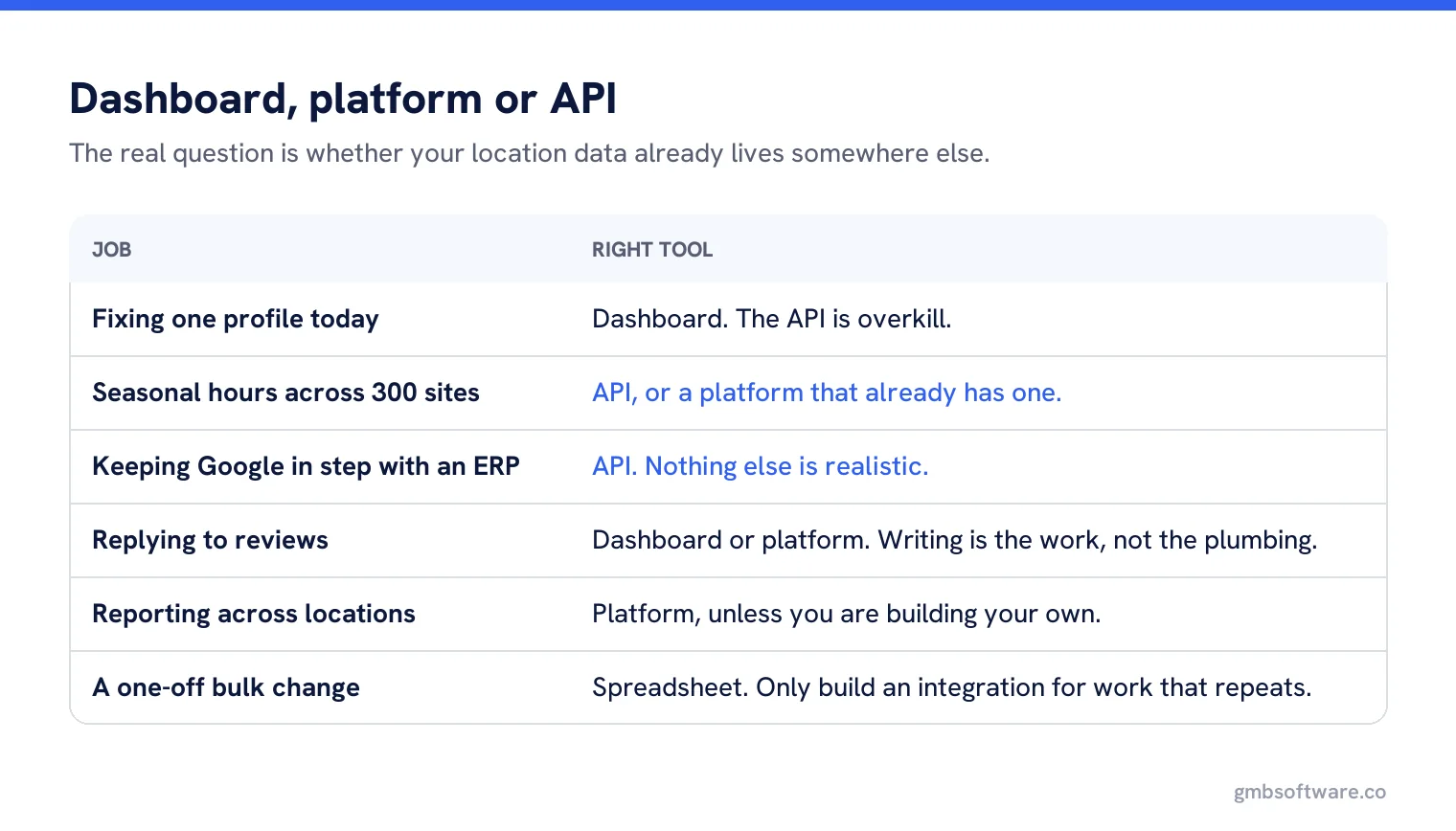
| Job | Dashboard | API |
|---|---|---|
| Fixing one profile today | Right tool | Overkill |
| Opening a new branch | Fine | Worth it if openings are frequent |
| Hours that change by season across 300 sites | Painful | Right tool |
| Keeping Google in step with an ERP or PIM | Not realistic | Right tool |
| Replying to reviews | Fine, and often better | Useful for routing and alerts |
| Reporting across locations | Limited | Right tool, or use a platform that already does it |
| One-off bulk change | Spreadsheet is simpler | Only if you will repeat it |
The third option most people actually need
Between the two sits a platform that already holds the API access and presents the useful parts as screens. For most businesses this is the sensible choice, because the cost of the API is not the API: it is the developer, the error handling, the quota management, and somebody being available when a change silently stops working.
The honest test is simple: do you have an engineering team that will still be there in two years. If the answer is no, a direct integration becomes an orphan the first time Google changes something.
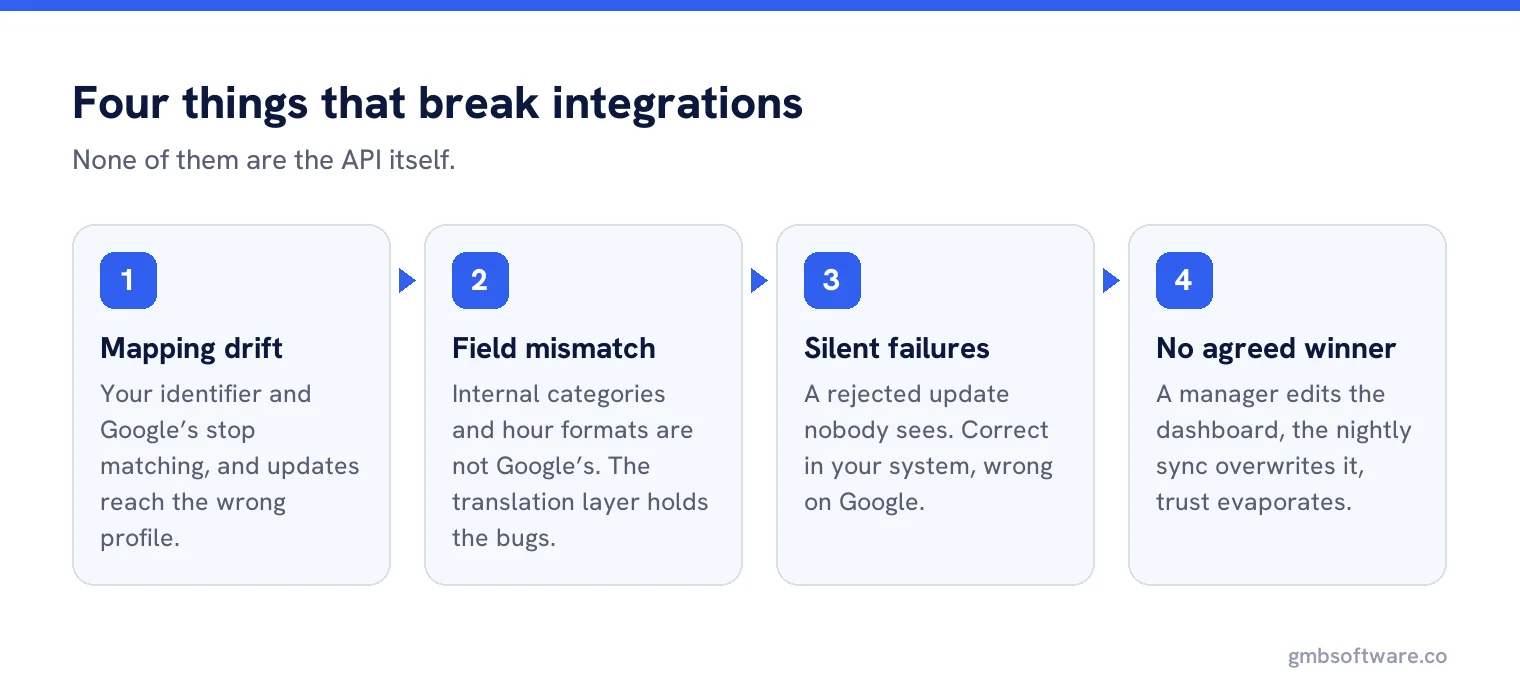
What breaks in API integrations
Mapping drift
Your system says “Store 112”, Google holds a different identifier, and nobody notices until updates go to the wrong profile. The store code is the join, and it has to be sacred.
Field mismatch
Internal category names are not Google categories. Internal hour formats are not Google hour formats. Every integration needs a translation layer, and that layer is where the bugs live.
Silent failures
A rejected update that nobody sees is worse than an outage, because the data looks right in your system and is wrong on Google.
Who wins
If somebody edits a profile in the dashboard and the integration overwrites it that night, the local manager stops trusting the system. Decide which source wins, per field, and write it down.
The source of truth question
An API integration forces a decision most organisations have avoided: where does the authoritative version of a location’s data live? Until that is settled, an integration simply automates the argument. There is more on settling it in our guide to one source of truth for location data.
A worked case
A garden centre group with nine sites asked for an API integration because their hours change four times a year with the seasons. Nine sites, four changes, thirty six edits a year. The integration would have cost weeks of development and would need maintaining forever, to replace about two hours of work annually.
The opposite case: a franchise network with 400 restaurants where menus, delivery partners and opening times change constantly, and the authoritative data already sits in a franchise management system. Here the manual route is not slow, it is impossible, and the integration pays for itself in the first quarter.
The deciding factor in both was not the number of locations. It was whether the data already existed somewhere else and changed on its own schedule.
What not to expect
The APIs will not give you ranking data, they will not give you competitor information, and they do not let you do anything that the guidelines forbid in the dashboard. Anything promising API-based ranking access is describing something else, usually scraping, and it carries risks the API does not.
Quotas and rate limits
One practical detail that catches teams out: API access comes with quotas, and a first integration that works perfectly against ten locations can fail against four hundred simply because it asks too fast. Build in retries and backoff from the start rather than discovering the limit during a rollout, and keep an eye on which operations are expensive, because reading everything every night is rarely necessary when only a handful of fields change.
A reasonable decision rule
Under twenty locations, with data that rarely changes: dashboard and a platform. Twenty to two hundred, with regular changes: a platform, and consider a feed from your own systems into it. Over two hundred, or with data that changes weekly from another system: a direct integration is probably worth the engineering, provided you can keep it alive.
Whatever you choose, keep the dashboard usable by humans. The best integrations still leave room for a local manager to fix a wrong opening time at nine in the morning without raising a ticket.
API power without the engineering bill
Manage every profile from one place, with the integrations already built and maintained for you.
Frequently asked questions
What do the Business Profile APIs do?
They let applications manage Business Profile account and location data programmatically, including photos, posts and reviews, and who co-manages the data.
Can anyone use the Google Business Profile API?
No. Google requires a valid Google account, a legitimate business purpose, a Google Cloud project and a business website URL, and the request is reviewed.
Do I need the API or just a platform?
Most businesses under twenty locations need a platform, not an integration. The API costs engineering time, error handling and long term maintenance.
Can the API tell me my rankings?
No. The APIs manage profile data. Anything offering ranking data through them is describing something else, usually scraping.
What breaks most often in an integration?
Identifier mapping between your system and Google, and silent rejections, where data looks correct internally while the profile on Google is wrong.
Sources
The Google documentation behind the guidance on this page. Google changes these pages without notice, so check the date on any figure before you rely on it.