


Onboarding a client’s Business Profiles is a sequence, and the sequence matters more than the speed. Get manager access before you promise anything, export the current state of every profile before you change a single field, agree who approves changes, then fix risks before you fix anything that shows. A first afternoon spent on access and evidence looks unproductive and prevents every argument that happens later.
Onboarding client Google Business Profiles has one reliable failure mode. The fastest way to lose a client in month three is to do brilliant work in week one without recording what the profiles looked like when you arrived.
Before you touch anything
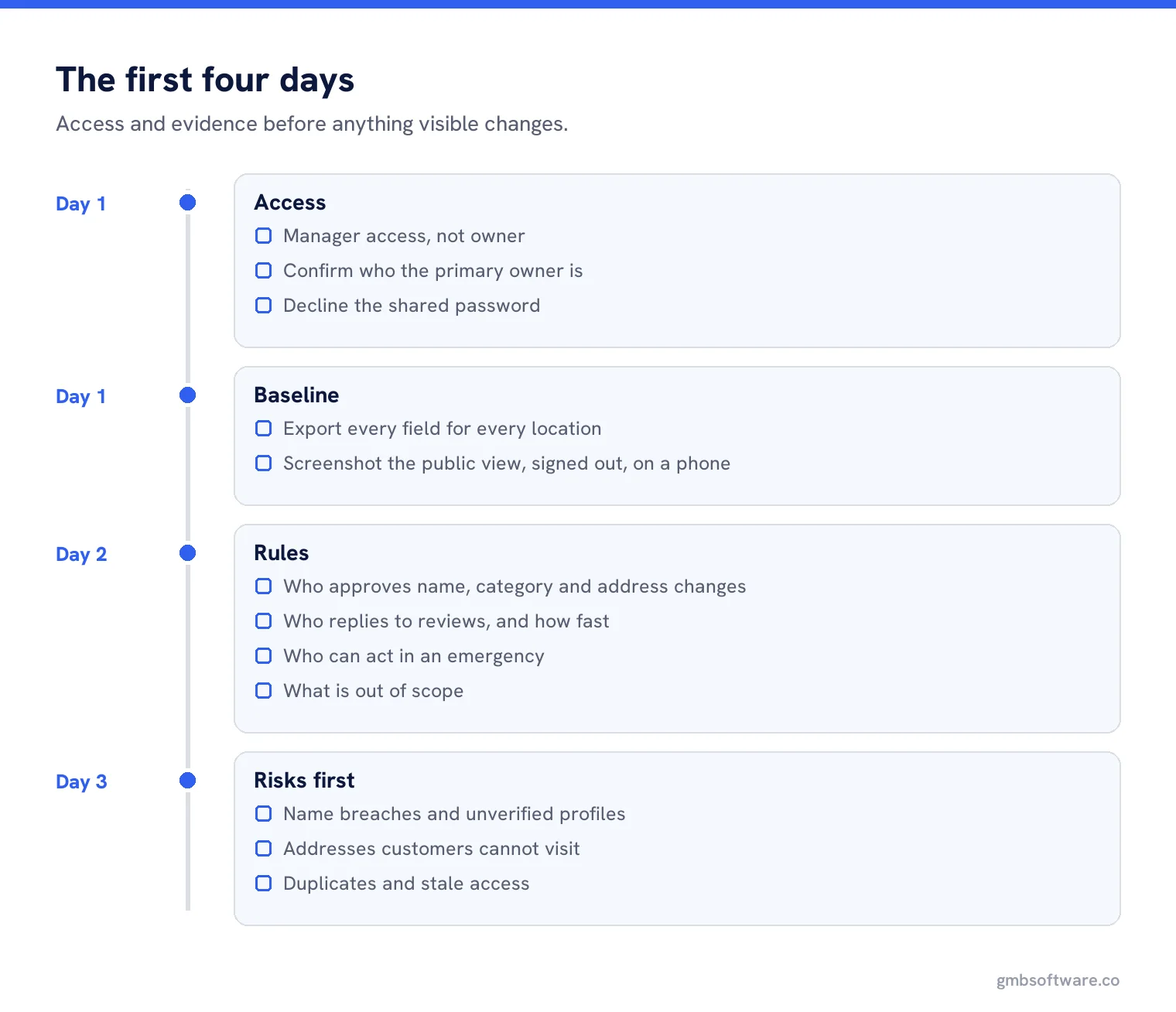
Get access the right way
Ask to be added as a manager, not an owner. Google’s roles let a manager do the work without being able to remove users or delete the profile, which protects the client and protects you.
Confirm the client owns the profile
Check who the primary owner is. If it is a previous agency, that is finding number one and it outranks everything on your to-do list.
Export the current state
Every field, every location, dated. This is the baseline you will be measured against.
Screenshot the public view
Signed out, on a phone. What the customer sees today, before you improve it.
The access conversation, done properly
Clients often offer their password. Decline it. Google’s own guidance is that each user should have their own Google account so profiles can be managed without sharing passwords, and a shared login makes it impossible to tell later who changed what.
If the client cannot find their own access, resist the urge to create a new profile. The request ownership process is slow but correct, and a duplicate profile created as a shortcut becomes a suspension risk and a support case at the same time.
Day one: the audit, not the work
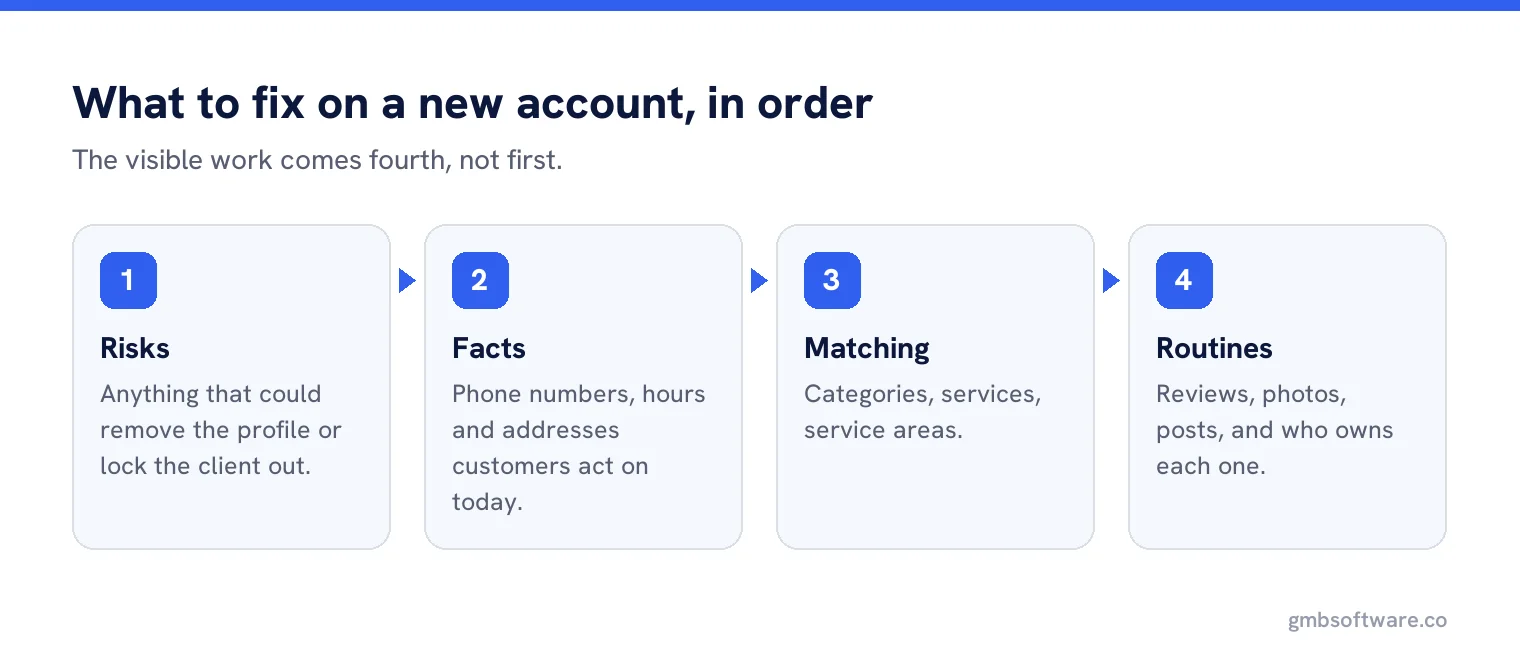
Run a full audit on every profile before changing anything. You are looking for three things in order: risks that could take a profile down, facts that are wrong today, and fields that are empty. Record all three with evidence. The client will want you to start posting; the audit is what tells you whether posting is even the right first move.
Day two: agree the rules
Five decisions, written down, before any changes go live.
- Who approves changes to the name, category or address.
- Who replies to reviews, and how fast, including the bad ones.
- Who owns photos, and where new ones come from.
- What happens in an emergency, such as a closure or a flood, and who can act at nine on a Sunday.
- What is out of scope, so nobody assumes the website is part of the deal.
Day three: fix the risks
Name breaches, unverified profiles, addresses that cannot be visited, duplicates, and anyone with access who should not have it. These produce no visible improvement and prevent the disappearance of everything else you are about to build. Explain that to the client in one sentence and do it anyway.
Then the visible work
Only now do categories, services, hours, photos and the review routine start. The difference is that each change is now made against a recorded baseline, with an agreed approver, on a profile that is not about to be suspended.
| Week | Focus | What the client sees |
|---|---|---|
| 1 | Access, audit, baseline, rules | A document, not a change |
| 2 | Risks and factual errors | Quiet fixes, one or two visible |
| 3 | Categories, services, hours | A more complete profile |
| 4 | Photos and the review routine | Activity they can point at |
Onboarding a group rather than one profile
With twenty or more locations the same sequence applies, but two steps grow. Access has to be checked location by location, because it is never uniform, and the baseline export becomes the single most valuable artefact of the engagement. Set up groups and labels during onboarding rather than later, since retrofitting a labelling scheme across an estate is a week nobody has budgeted for.
What to put in the first report
Not a list of thirty findings. Three sections: what was at risk and is now fixed, what was factually wrong and is now right, and what we are starting as a routine. Attach the audit as an appendix for the one person who will read it.
Setting expectations about timing
Tell the client at the start that profile work has two speeds. Factual corrections take effect quickly. Anything involving verification, a name change or an address change runs on Google’s clock, not yours, and can take days or weeks with no way to chase it. Saying that in week one is honest; saying it in week four sounds like an excuse.
The handover you hope never happens
Write the exit at the start. Which accounts are removed, who confirms the client still holds owner access, and what gets handed over. Agencies that do this are rare, and it is remembered for years, usually in the form of a referral from a client who left and came back.
A worked onboarding
A regional law firm, four offices, taken on in October. Day one found that two profiles were owned by the firm’s former marketing manager, one office was listed at an address the firm left in 2024, and all four names carried “Solicitors Leeds” style suffixes that are not on any door.
Nothing visible happened for eight days. The firm regained ownership on the two profiles, the moved office was corrected and re-verified, the names were cut back to the real firm name, and a dormant fifth profile from a closed branch was found and marked closed. Only then did categories, services and photographs start.
The first monthly report opened with one sentence: two of your four profiles were controlled by someone who left the firm. That sentence did more for the relationship than any ranking chart, and it was only possible because the first afternoon went on access rather than output.
Common onboarding mistakes
Starting with posts because they are easy to show. Changing categories in week one before anyone agrees what the business actually is. Taking owner access because it is quicker. Promising improvements before seeing the audit. And the big one: no baseline, which turns every later conversation about results into a matter of memory.
Onboard a whole estate in an afternoon
Pull every profile into one place, audit them in a single pass, and keep the baseline you will be judged against.
Frequently asked questions
Should an agency be an owner or a manager?
A manager. Managers can do the work but cannot remove users or delete the profile, which protects the client and keeps the agency out of an awkward position.
What should I do before changing anything on a new account?
Export every field for every location and screenshot the public view signed out. That baseline is what later conversations about results depend on.
What if the client cannot access their own profile?
Use Google’s request ownership process. Creating a new profile as a shortcut causes duplicates and risks suspension for both profiles.
Should I take the client’s password?
No. Google’s guidance is that each user has their own account, and a shared login makes it impossible to tell who changed what later.
What goes in the first client report?
Three sections: what was at risk and is fixed, what was wrong and is now right, and what is becoming a routine. The full audit goes in an appendix.
Sources
The Google documentation behind the guidance on this page. Google changes these pages without notice, so check the date on any figure before you rely on it.